


Innovation Tool Kit (ITK): It Really Does Work!

Today’s post is by Lynne Cuppernull, one of our new members of the ITK community, plus a brief interlude by Jim Jellison

Last September, about 80 MITRE leaders in the Health FFRDC participated in a two-hour introduction to the Innovation Toolkit (ITK)—a collection of methods and techniques curated by a team of cross-disciplinary MITRE experts to help teams work together to solve hard problems.  A lot of leaders learned about the tools, but did anyone DO anything with them? You are about to find out!

Charity Begins at Home, With a Pre-Mortem!

I figured I’d better be able to do what we were asking our leaders to do. So I tested out a couple of tools with some internal teams. The leadership team in my department took the Pre-Mortem tool for a spin. Just like it sounds, the Pre-Mortem involves what may come before a “death” – in this case, our department utterly and totally failing. By imagining failure, we were able to effectively land on what success would look like for us a year from now and we actually had fun imagining the utter failure (once we were able to stop hyperventilating over the perceived failures, which were pretty epic).

We also tried using the Rose, Bud, Thorn tool as a quick way to assess our weekly division leadership team meetings and came up with good ideas about how we could use the time more effectively. I love the Rose, Bud, Thorn tool because it is so easy, and you can use it with anything or anyone (including kids). It’s a simple framework that helps a group conduct an analysis by visually categorizing the positive (Rose), potential (Bud), or negative (Thorn) aspects of a topic, such as a system, product, process, meeting – you name it.

Where the Rubber Meets the Road: ITK and Sponsor Conversations

The tools worked well for us internally – but would our sponsors appreciate them? We enlisted the help of Dan Ward, one of the ITK originals, to work with us to plan a conversation with our sponsor to ensure we really understood the problem the sponsor had. Enter Dan and the Problem Framing canvas to help us work with the sponsor to understand more about the most critical problems facing this agency. We knew our sponsor worked best with a few thoughtful questions, so we tuned the ITK tool to simplify it for our discussion with the sponsor. Some of the questions we asked, in addition to “What is the problem?” were:

  • Who has this problem?
  • When and where do they experience it?
  • What are the elements of the problem (physical, social, emotional, professional)
  • What is the scope (small to big, trivial to serious, static to dynamic)
  • Who else has it? Who does not have it and why not?
  • Why haven’t we solved it?

Not only did we come up with one problem statement in our one-hour meeting with the sponsor, we came up with two, which we then used to frame out a couple of discussion documents with approaches, that became our next conversation with the sponsor.

ITK in the Real World: CDC and CODI

Hoping I was not alone, in late October I put out a call to all the people who attended the two-hour ITK sessions in September to see if others had tried the tools yet. It turned out some people had – yay!

Jim Jellison was one of the few brave people who went right to using an ITK took on a health data project. In his words, here is how it went:

Program: We are  integrating data from clinical electronic health record systems with data collected by community-based organizations that deliver programs and services for chronic disease management.

Goal: The idea is to improve data capabilities for both evaluating disease intervention programs and conducting public health surveillance. The work involves partnerships between healthcare providers, CBOs, national associations, and other stakeholders that have influence in the locations we are conducting pilot implementations.

Problem statement: It’s the first time these partners are coming together to create this type of data exchange and there are many ways things could go wrong.

ITK in action: To identify some of those risks and build trust among this nascent partnership, we worked with the ITK team to conduct a Pre-Mortem exercise. I was intrigued with the tool yet wary of making the sponsor nervous by discussing failure. We vetted the concept with them in advance and they were game. With the ITK team facilitating the exercise, the MITRE project team was able to participate as another member of the partnership.

Results: To my relief, the session was well received. Our partners’ concerns, or what they thought failure might look like, highlighted the prospect of implementing functional data exchange but not generating useful information or sustainable infrastructure for our partners. Perhaps more importantly, by giving colleagues (and ourselves) permission to be skeptical and candid we strengthened the collaborative relationships we’ll need for this project.

Back to Lynne Cuppernull…

My hope, as we head into 2021, is that we can expand our use of these simple and effective tools across the Health FFRDC, using them with each other and with our sponsors to solve hard problems.

I am finishing up being “certified” as an ITK user and coach for others and I would love for more people to become certified too. Just fill out Contact form if you are interested. But you do not have to be certified to use the tools! Just willing to experiment and be open to new ways of doing things, like brainstorming.

We would love to hear more examples of how people have used the ITK tools–what worked, what didn’t, what you modified. Please let us know in the comments – and we will keep the information flowing about the tools!

Lynne
 

Collaboration Tips

This week’s blog post is by Maria Altebarmakian, one of our new ITK Trainees! 

By now we have all felt the pain of trying to collaborate and communicate with others remotely. Messages go unseen or unanswered, a train of thought is interrupted by a constant stream of notifications, and collaboratively iterating on ideas requires more intentionality. The online environment completely transforms how ideas can be shared, how they are communicated, and how they are understood.

Different mechanisms for online communication impact the extent and ways in which a group works and makes progress. Sometimes a quick chat message is enough, while other situations require a more in-depth video call. Intentionally designing the way participants communicate and collaborate online can make it easier for groups to work together on a task.

Here are some tips for three types of online communication for collaborative environments: text-based, audio-only, and video + audio.

  1. Text-based
    What are some examples?
    Email, Slack, Teams chat, message boards
    What are the advantages?
    It doesn’t require that all participants are contributing at the same time, so coordinating schedules becomes less of an issue. People also get more time to reflect on the ideas of others and formulate their own ideas.
    What are the challenges?
    When communication is totally text-based, it becomes more time-consuming to both generate contributions and understand contributions. Typing requires more upfront effort: you type, you read, you re-read, you edit, you add, you delete, etc. In a large enough group, many contributions may be added to the discussion from the time you start typing an idea to the time you are ready to send it. Monitoring and understanding the conversation can become more difficult as the sequence of the conversation can become jumbled.Also, tone of voice and non-verbal cues are lost with this form of communication. It becomes more difficult to know if others agree, are listening, noticed your message, and so on.
    How do I mitigate these issues?
    Organize the conversation into threads. It will become easier to monitor the space and also easier to retroactively understand the train of thought the group went through to arrive at a given conclusion.
    Slow down the pace. Some people will want to curate their response before sending it to the group. This can result in them spending a long time thinking through what they want to say. By slowing down the pace of the conversation, these individuals can find the time and opportunity to also make their thoughts heard.
    Use emojis to express that you’re paying attention. Keep in mind that the person on the other side of the screen does not know if you’re paying attention and noticing their messages unless you actively respond in some way. Adding a quick thumbs up or thumbs down can help others know where you stand on a topic of discussion. Responding with short messages to convey that a message was received and understood also can help to mitigate this issue.
  1. Audio-only
    What are some examples?
    Phone calls, Teams (without video), Zoom (without video), Skype calls
    What are the advantages?
    Vocal intonation comes across, so you can tell if someone is being genuine, sarcastic, engaged, or uninterested.
    What are the challenges?
    Depending on group size, it can be difficult for everyone to have an opportunity to contribute. Determining whose “turn” it is to speak isn’t obvious and participants who are shy might feel uncomfortable contributing.
    How do I mitigate these issues?
    Set up expectations for the flow of conversation. This may look different from one meeting to the next, depending on group size, hierarchy among participants, and other factors. For some situations it may make sense to have a moderator who manages turn-taking within the conversation. For other situations, setting up an agenda with a timeframe for each topic of discussion may suffice.
    Make space for quieter participants to contribute. If you are hosting a conference call with audio only and notice that some participants are taking over the conversation while others are quietly listening, gently asking those on the call who haven’t spoken in a while if they have anything to contribute on the current topic opens up the space for more points of view to be expressed.
  1. Video + Audio chat
    What are some examples?
    Teams, Zoom
    What are the advantages?
    With video chats, both vocal intonation and some non-verbal cues can be expressed. You can see what participants are nodding along or shaking their heads, who is distracted by notifications elsewhere on the screen, and so on. This can help to make speakers feel that there are others actually present with them, which can make the space feel more comfortable.
    What are the challenges?
    Video calls can be intimidating for some compared to other online avenues of communication. After a long day of video calls, people start to experience “Zoom fatigue”, making it more difficult to stay attentive and focused.
    The video feed can also invite in many distractions, with people focusing more on someone’s artwork on the wall behind them instead of what the person is saying.
    How do I mitigate these issues?
    Not everyone needs their video on at all times. Setting up some recommendations for participants, such as turning on video when they want to contribute or having only a subset of the group keep their video on, can leverage some of the benefits of video calls while mitigating some of the challenges. Being strategic about when you share your camera can help to combat “Zoom fatigue” and make the space feel less intimidating.
    Use custom backgrounds. Most of the meeting software now will allow users to set custom backgrounds that will blur out or replace their background so the focus will be on the speaker themselves. A good background will be simple: a solid color, a generic conference room, or a simple background blur are all great options. This can help to minimize distractions.
    Background distractions aren’t a negative in all cases. In some circumstances, building rapport within the team is an important element of the online meeting. Meeting with others online can feel distant and impersonal. Being able to see their space behind them can help to make them more “real”. For example, seeing a guitar in the background of another participant’s video feed can spark social conversations about music or learning an instrument that ultimately help participants feel more connected. In the long run, this can help the group feel more comfortable discussing their ideas, which boosts the potential for productive collaboration.

The best method for online communication will vary from one collaborative situation to the next. The key is to be thoughtful when deciding how to organize your team’s online collaborative sessions.

What have you found to be challenging when it comes to effectively communicating online? What tips and tricks do you use to address those challenges?

Building Your Cadre of Mentors

Building Your Cadre of Mentors

(Today’s post is by Gabby Raymond, one of our new Team Toolkit Trainees!)

Finding a good mentor is like getting a personalized self-help book, one that is full of insightful questions and practical guidance tailored to you. A traditional mentor focuses on guiding your personal growth. However, you can receive a wide array of guidance from a variety of perspectives when you work together with someone, so let’s expand our vocabulary a bit and use the word Collaborators as a more general term.

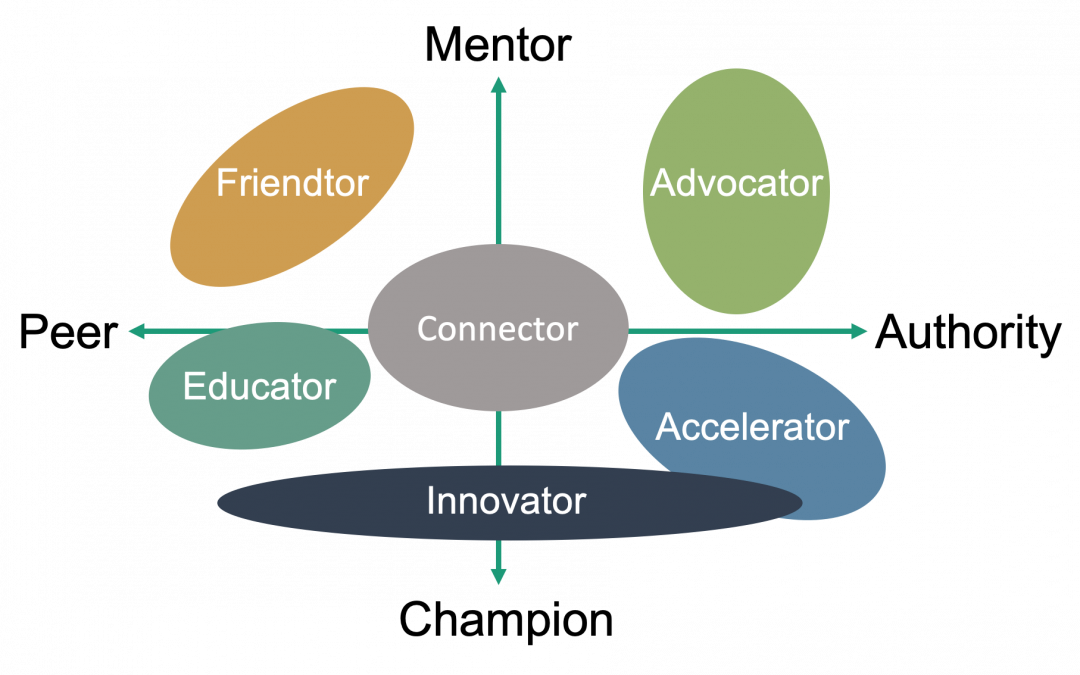
Just like you wouldn’t need five copies of the same self-help book, it’s useful to have different types of Collaborators, each playing a different role. The alignment chart below illustrates a variety of Collaborators based on the people I have found particularly valuable in my life. The goal of this diagram is to help you identify any gaps in your current cadre and opportunities to round out your group. And the best part, meeting up with one of these Collaborators only costs about as much as a cup of coffee! (usually)

In this chart, the horizontal axis reflects the Collaborator’s relationship to you; your peers are on the left while those with more seniority, formal authority, or clout are on the right. The vertical axis depicts the Collaborator’s perspective on guidance. The guidance you get from people at the top of the vertical axis helps you with personal growth, while the guidance from people at the other end of the axis helps you solve problems or champion solutions.

When I think of a traditional mentor, I think of an Advocator in the upper right quadrant. As someone with clout who can help you grow career-wise, they’ve been in your shoes and can give you advice. Advocators also know other authority figures with whom they can share your accomplishments; they’re the Collaborator who can help you get your next promotion. I find advocating for yourself and having others advocate for you is an important way to gain visibility in your community.

In the upper left side is the Friendtor, a peer who you trust to give more personal advice. They walk the line of friend and mentor, so they know all the best things about you but can also point out your flaws. I personally ask my Friendtors for advice on team dynamics and navigating conversations with my leadership.

An Educator straddles the line in the lower left quadrant. They are someone with specific domain knowledge about the problem you’re trying to solve. An Educator’s role is to teach you skills or information relevant to your work and are the Collaborator you’re most likely to shadow. I’ve found Educators to be closer to a peer than an authority figure, but that’s not always the case.

An Innovator is a Collaborator who is a problem-solving powerhouse, and they span the whole bottom half of the chart. Innovators can either have a background in your problem area or can be someone with a fresh perspective – both mentalities can be incredibly useful depending on your situation. People who embody the mindset of Team Toolkit are my go-to Innovators.

Solidly in the lower right Authority/Champion quadrant is the Accelerator – think of them as someone who will help catapult your idea. They’ve got high-powered connections and stay up to date with the current trends. The strategic prowess of an Accelerator means they are the ones who can help develop and refine your idea. These Collaborators are moving quickly from success to success and can help you do the same.

Finally, at the center of this chart is a person with a wide network, the Connector. They’re the Collaborator who seems to know everyone. Having a Connector introduce you to someone they know personally is often more successful than cold-emailing someone with whom you want to grab a virtual coffee. They can be your gateway to many of the other Collaborators in this chart.

I hope this post has helped you view mentors through a new frame of reference. If you have any questions, feel free to reach out and grab a virtual cup of coffee (or tea!) with me.